
How to make animated stickers in Telegram
1. animated stickers - what are they?
Animated stickers in Telegram - is a fun way to express your emotions and feelings through creative and funny images. Unlike ordinary stickers, animated stickers move and capture the attention of your interlocutor. They add bright colors to your correspondence, making communication even more interesting and lively.
2. Format of animated stickers in Telegram: basic requirements

To create animated stickers in Telegram, you need to meet certain requirements:
- File size: Animated stickers must not exceed the size of 512x512 pixels and must not exceed the limits of this canvas. The size limit ensures that stickers load quickly and play smoothly in the app. However, even with the limited size, you can unleash your creativity and create expressive animations that will catch the attention of users.
- File Weight: The final size of the animated sticker after rendering should not exceed 64 KB. The limitation in file weight is important to save users' mobile traffic and ensure fast data transfer. When creating stickers, it is important to take this parameter into account in order to maintain high animation quality with minimal file size.
- Duration of animation: Telegram also limits the duration of sticker animation to 3 seconds. When creating animated stickers, it is important to pay attention to the timing of the animation so that it is long enough to convey the meaning, but not too long so as not to tire the user.
- File Format: Telegram supports stickers in TGS (Telegram Animated Sticker) format, which provides excellent animation quality with a small file size. TGS format is based on the technology Lottie and provides more freedom and possibilities to create complex and dynamic animated stickers. It supports alpha channel, which allows you to create stickers with transparent parts, making animation even more creative and interesting.
- Infinite animation repetition: To keep the stickers interesting and attractive, it is recommended to set the animation to infinite repeat. This means that once the animation is complete, it will automatically play again. This approach makes the stickers more dynamic and exciting for the conversation partner, who will be able to look at them an unlimited number of times without tiring.
- Animation speed: Sticker animation should run at 60 frames per second. This is the standard frame rate for smooth and natural motion. When creating the animation, pay attention to each frame to ensure smooth and continuous movement of the objects.
These are the requirements presented on the official website Telegram. Following these requirements will allow you to create high-quality and attractive animated stickers for Telegram. Don't forget that creativity and originality play a key role in creating successful stickers. Use animation, colors and movements to give your stickers a unique character and make them memorable for users. We will tell you how to make animated stickers in Telegram below.
3. How to create animated stickers in Telegram: step-by-step instructions
So how to make animated stickers in Telegram? Creating animated stickers in Telegram is easy and fun. To do this, let's use the Telegram bot "Favorite Sticker Bot.". Then follow these step-by-step instructions:
Step 1: Prepare your materials. Download GIF animation or the clip from which you will create the sticker.
Step 2: Find and launch the Telegram bot "Favorite Sticker Bot.".
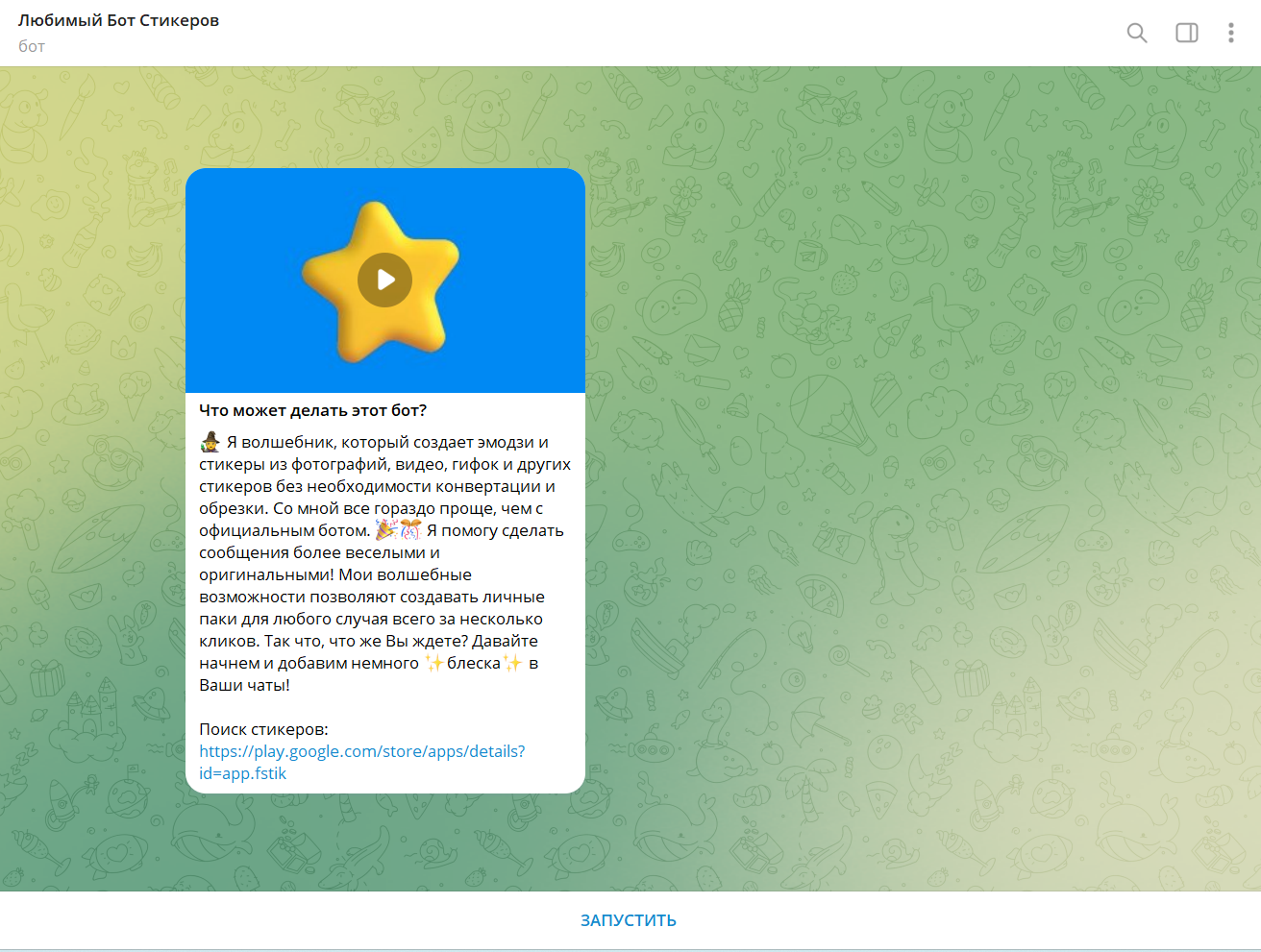
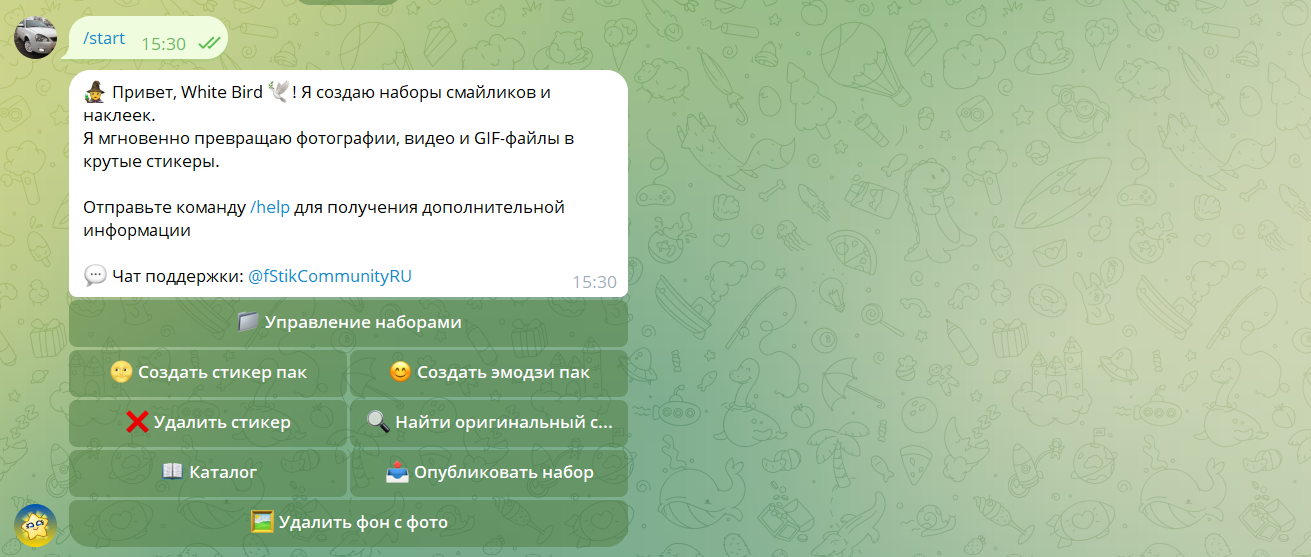
Step 3: Select "Create Stickerpack"
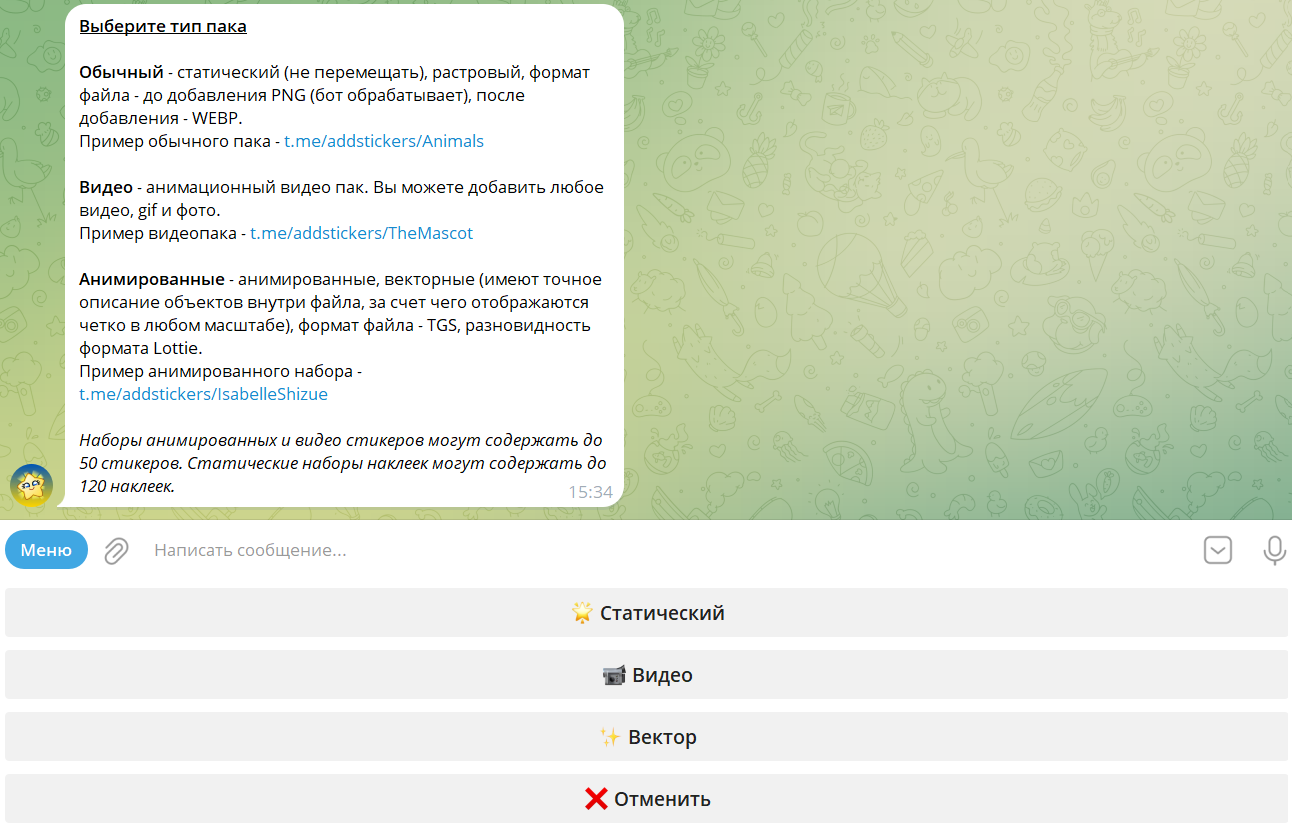
Step 4: Select the "Video" stickerpack type
Step 5: Enter a name for the new stickerpack or select from the following options

Step 6: Enter the address of the stickerpack

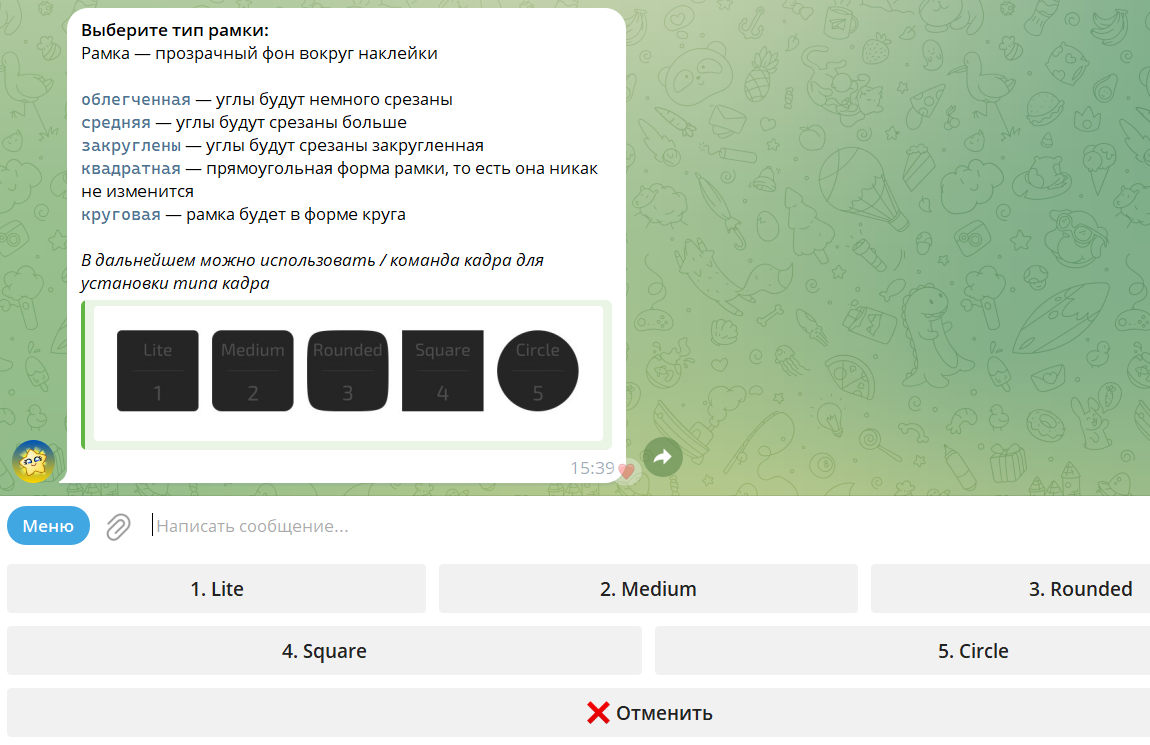
Step 7: Select the type of frame
Step 8: Attach the previously prepared file
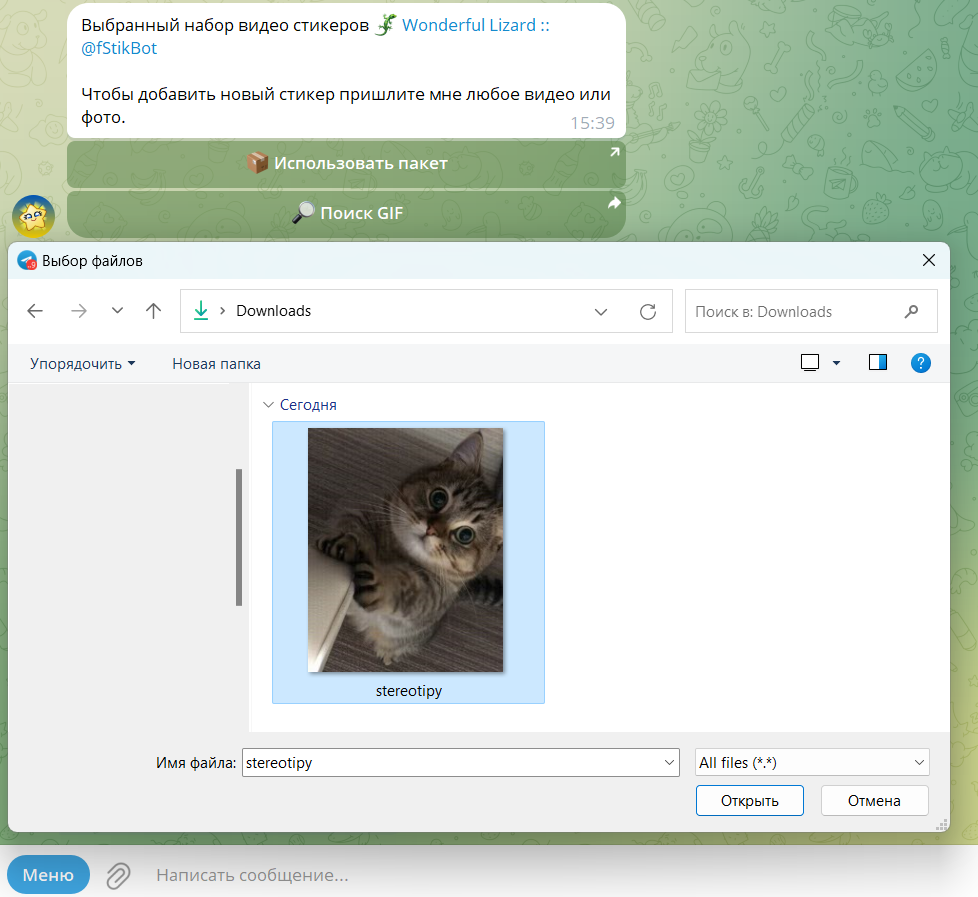
Step 9: Wait for the conversion to complete

Step 10: Optionally send an emoji that matches the sticker

Step 11: Add the created set of stickers to yourself and start socializing

Making an animated sticker for Telegram online is now a no-brainer, it's now affordable and fun thanks to simple step-by-step instructions. If you enjoyed the process of creating stickers in Telegram, you might like to learn about how to make a gif in VK or else how to write a dating post in VK.
4. How to add an animated sticker to Telegram?
Learn more about how to upload animated stickers to Telegram. After creating your animated stickers, you will of course want to share them with your friends.
To add an animated sticker to Telegram, follow these steps:
- Open a chat room in Telegram: Enter the chat or dialog where you want to add your animated sticker. Get ready to delight your friends with creative and colorful content!
- Click the sticker icon in the text entry field: At the bottom of the screen, you will see a sticker icon that looks like a smiling icon with eyes. Tap it to open the sticker gallery.
- Choose your animated stickers from the sticker gallery: Scroll through the gallery until you find your created animated stickers. They will be marked with a special icon indicating their animated nature. Select the sticker you want to send.
- Send the sticker to the chat room by clicking on it: After selecting a sticker, click on it to add it to the text input field. Then click the send button (airplane icon or arrows) to share your animated sticker with your friends.
Now your creative sticker will animate the chats in Telegram, bringing fun and joy to your conversations. Feel free to share your creations and surprise your friends with unique animations. Delight others with bright and original expressions with the help of animated stickers in Telegram!
5. Review of applications for animated stickers in Telegram
You can use not only the bot for animated stickers in Telegram to create stickers. There are many apps specifically designed for creating animated stickers in Telegram. Some of them include editing features, adding effects and text, which makes the process of creating stickers even more fun and creative. Among them:
- Sticker Maker for Telegram: A simple and intuitive application for creating animated stickers. It provides many tools for editing and animating images. Downloading Sticker Maker for Telegram is easy - just go to the app store on your phone, search for the app you need and click on the "Download" button.
- Sticker Maker Studio: This is a powerful application with advanced editing capabilities. It allows you to add layers, text, effects and more to create unique animated stickers.
- GIF2Sticker Animated Stickers: An easy to use application that allows you to turn ordinary GIF images into animated stickers. Just upload a GIF and enjoy animation in your stickers.
With the use of these apps, you can bring your creative ideas to life by creating colorful and unique animated stickers to enrich your chats in Telegram.
6. Conclusion
In our article, we have clearly seen how to make animated stickers in Telegram. Animated stickers in Telegram are a great way to add fun and funny elements to your correspondence. Creating your own animated stickers is not only fun but also easy, thanks to the apps and tools available.
7. Frequent questions
A: Animated stickers in Telegram support the TGS (Telegram Animated Sticker) format, which provides excellent animation quality with a small file size. This format allows you to create creative and dynamic stickers without sacrificing image quality.
A: There are several great apps that will help you create unique animated stickers. Some of them are: Sticker Maker for Telegram, Sticker Maker Studio, GIF2Sticker Animated Stickers. They provide a variety of editing and animation tools, making the process of creating stickers interesting and fun.
A: Yes, you can easily add your animated stickers to your own sticker pack in Telegram. For example, after creating a sticker in a special app, save it to your device's gallery. Then open the Telegram app, go to sticker settings and add your animated sticker to your own sticker pack. Now it will be available for use in your chats.
A: Yes, you can use animated stickers in Telegram not only on mobile devices, but also on your computer. Once you add animated stickers to your pack in the mobile app, they will be automatically synchronized with the version of Telegram on your computer. Now you can enjoy interesting animations and your dialogs on the big screen. |
|---|